You haven't signed in yet, you can have a better experience after signing in
*Please complete the payment within {{receiveCouponInfo.expire_at}}Previous use*
You haven't signed in yet, you can have a better experience after signing in



Activity Rules
1、Activity time:{{ info.groupon.start_at }} ~ {{ info.groupon.end_at }}。
1、Activity time:cease when sold out。
2、Validity period of the Group Buying:{{ info.groupon.expire_days * 24 }} hours。
3、Number of Group Buying:{{ info.groupon.need_count }}x。
Please Pay Attention
1、Teamwork process: Join/initiate a Group Buying and make a successful payment - Within the validity period, the number of team members meets the activity requirements - Group Buying succeeded!
2、If the number of participants cannot be met within the valid period, the group will fail, and the paid amount will be refunded in the original way.
3、The number of people required and the time of the event may vary among different products. Please pay attention to the rules of the event.
SuperMemo is a tool for rapid learning and long-lasting memory. SuperMemo helps you learn quickly and retain knowledge for years. Although SuperMemo operates similarly to flashcard programs, its functionality far exceeds other programs. SuperMemo uses the principle of spaced repetition to present knowledge at the appropriate time when the brain is ready to reinforce memory. Using SuperMemo daily can easily help you remember 95% of what you have learned.
3 Key Facts About SuperMemo
How SuperMemo Works
Official Website:https://supermemopedia.com/wiki/Main_Page
Download Center:https://supermemo.apsgo.cn
Alternate Download: N/A
Shipping Time: Orders are processed manually
Operating Platform: Windows
Interface Language: Only supports English interface display.
Update Instructions: Supports minor version updates, such as 20.x.
Trial Before Purchase: Free trial.
How to Receive the Product: After purchase, the activation information will be sent to the email address used for ordering. You can also view the corresponding product activation code in your personal center, under "My Orders".
Number of Devices: 2 devices.
Changing Computers: You will need to apply for a new activation code on the new computer.
Activation Guide: To be added.
Special Instructions: To be added.
References:https://supermemopedia.com/wiki/Trouble_activating_on_a_new_computer

Any question

Web import:
Collection selector:
concept
Concept boxes can be created by pressing C enter
Enter in concept box Provide options:
Repeated History:
Sleep chart:
Importing from Excel allows merging sleep chart files
Separate collection may use different sleep chart files (for example, for two users with the same installation). Used files are displayed in the title
Nighttime Sleep Tracking Average Display Time Trend
Nap tracking average shows time trend
Learning time tracking average to display time trend
Plan:
mismatch repair
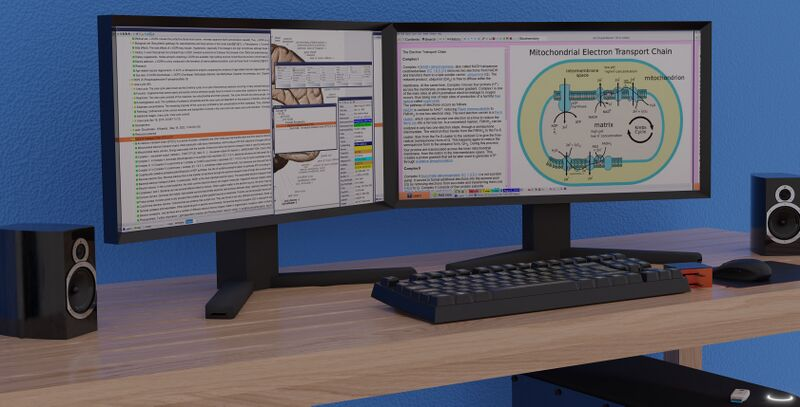
SuperMemo 19 for Windows runs on two monitors, with the Element window on one monitor maximized for comfort and convenience, while auxiliary windows (such as content, statistics, Element data, ancestors, etc.) are displayed on the other monitor.
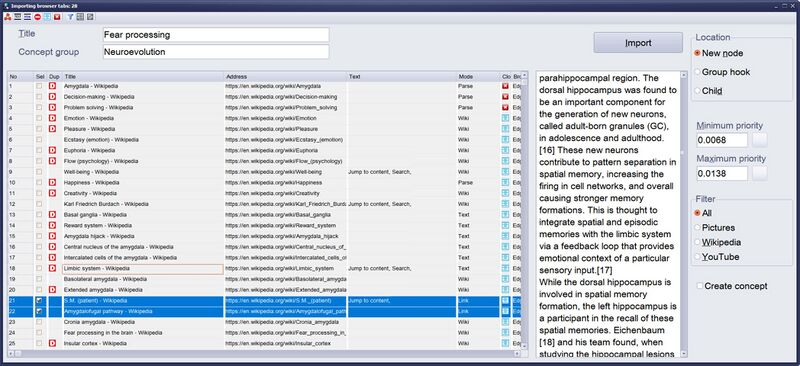
Importing web pages from Edge and Chrome in SuperMemo 19
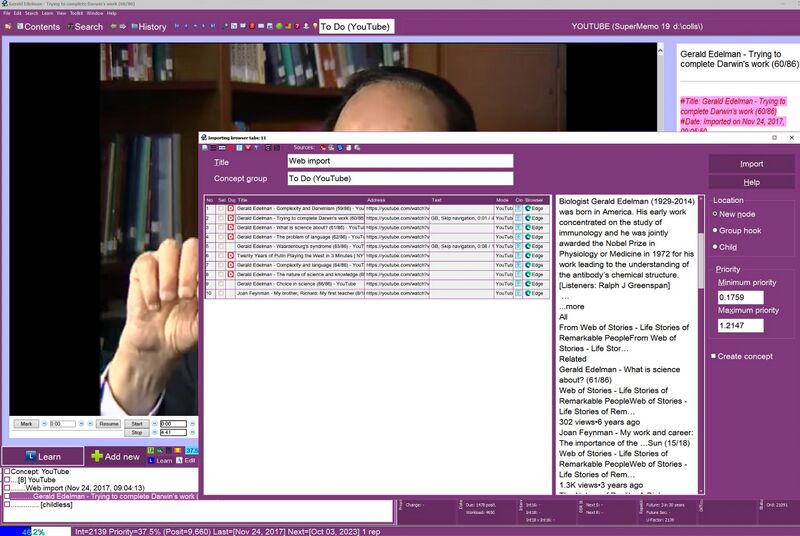
In the above figure, there are 10 YouTube videos featuring American biologist and 1972 Nobel laureate Gerald Edelman, and they have been selected to be automatically imported from MS Edge into SuperMemo (for incremental videos). 7 videos have been detected as imported and collected, and marked as duplicates (red D icon). The selected video will be imported as a newly added element for the child titled 'Web Import'. The import video with this priority will be within the range of 0.1759-1.2147%
🔗 Source text from:https://help.supermemo.org/wiki/What%27s_new_in_SuperMemo_19%3F